Quick answer: A Shopify SEO checklist covers six areas: store setup and indexing, product pages, collection pages, duplicate URLs, site speed and product schema. Shopify already handles a few basics for you, such as the sitemap, canonical tags and a sensible robots.txt file. The work that decides rankings is still yours: unique product and collection copy, clean URLs, a fast theme with fewer apps, complete product structured data and redirects whenever a URL changes.
Shopify is one of the easiest ways to start selling online in Pakistan, and that is part of the problem. Stores go live in a week, the products look great, and then nothing comes from Google. When we audit stores as part of our ecommerce SEO services, we see the same gaps again and again: copied supplier descriptions, empty collection pages, slow themes loaded with apps and product pages that Google cannot read properly. This Shopify SEO checklist walks through each area in the order we fix them, with the settings most Pakistani stores get wrong.
Still choosing a platform? Read our comparison of WordPress vs Shopify for e-commerce first. Everything below assumes your store is already on Shopify.
What Shopify does for you, and what it does not
Shopify takes care of some technical SEO out of the box. Knowing which parts are automatic saves you from paying for apps that do the same thing, and shows you where your own effort should go.
| Area | Handled by Shopify | Your job |
|---|---|---|
| XML sitemap | Created at /sitemap.xml and updated when you add products, collections, pages or blog posts | Submit it in Google Search Console and keep the store out of private mode |
| robots.txt | Default file blocks admin, cart, checkout, account and sorted or filtered collection URLs | Leave it alone unless you know exactly why you are changing it |
| Canonical tags | Product URLs inside a collection point back to the main /products/ URL | Make sure your theme links to that main URL and check for duplicates in Search Console |
| Titles and meta descriptions | Fields on every product, collection, page and blog post | Write them yourself. The defaults just reuse the product name and description |
| Product schema | Many themes output basic Product markup | Check it is complete and that apps are not adding a second, conflicting copy |
| Content | Nothing | Unique product descriptions, collection copy, alt text and buying guides |
The Shopify SEO checklist at a glance
Here is the full Shopify SEO checklist in the order we work through it. Each step is explained in the sections below.
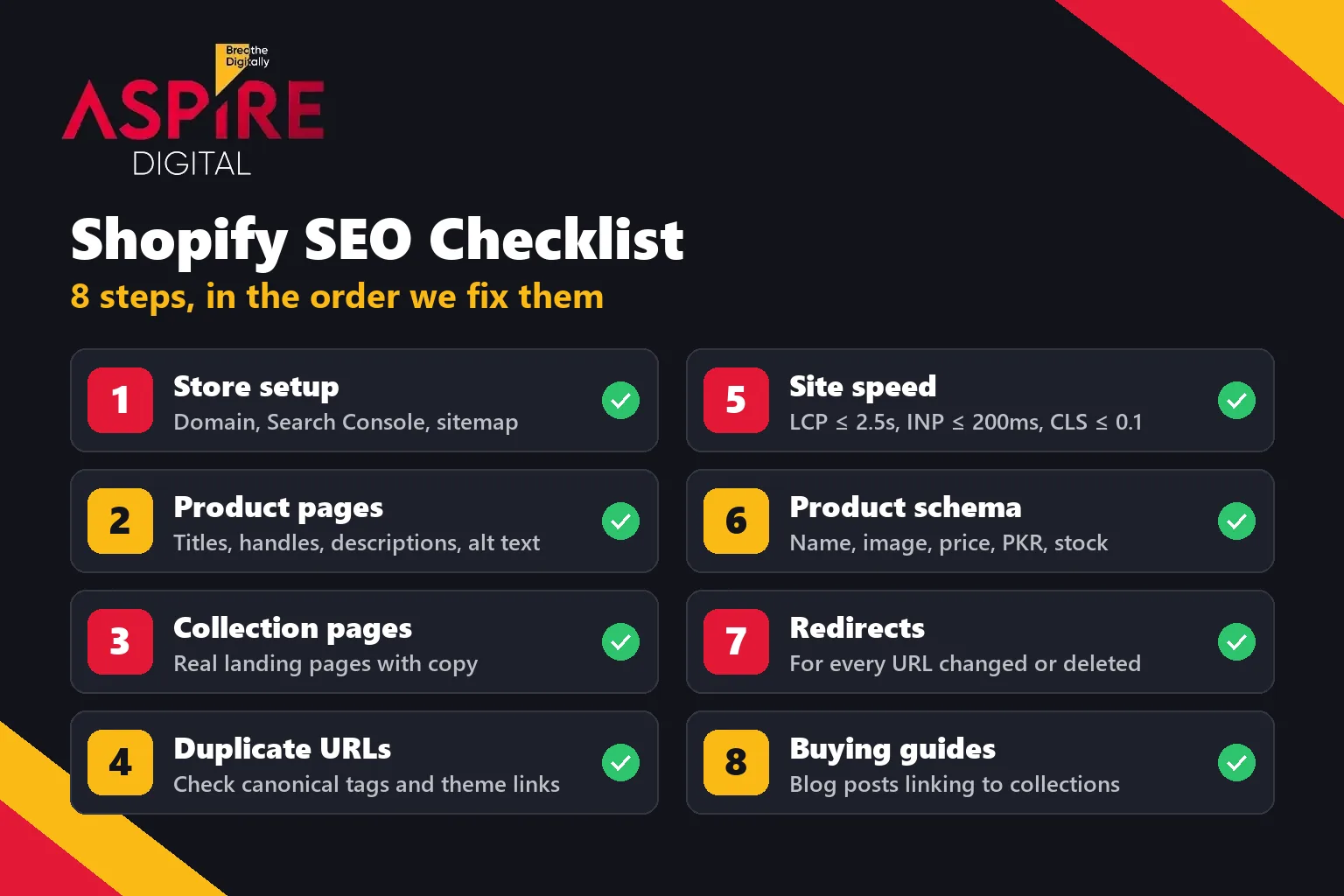
- Set up the store for indexing: primary domain, Search Console, sitemap
- Optimise product pages: titles, handles, descriptions, images
- Turn collections into real landing pages
- Control duplicate URLs and check canonical tags
- Improve Shopify site speed
- Complete your product schema
- Redirect every URL you change or delete
- Add buying guides and internal links
1. Set up the store for indexing
Before any on-page work, make sure Google can actually reach and read your store.
- Remove the password page. A store in private mode cannot be crawled, and Shopify notes that sitemap readers cannot access the sitemap while it is on.
- Pick one primary domain. Connect your own domain (for example a
.pkor.com) and make sure themyshopify.comaddress and any extra domains redirect to it. - Verify Google Search Console. Add the verification meta tag to your theme, or verify through your domain's DNS.
- Submit
/sitemap.xml. Shopify creates it for you, with separate sitemaps for products, collections, pages and blog posts. - Check the Pages report after a few weeks. Look for products listed as "Crawled, currently not indexed". This usually points to thin or duplicate content, not a technical block.
2. Shopify product page SEO
Product pages are where buyers land when they search for a specific item, model or brand. Shopify product page SEO comes down to five fields you edit on every product.
Page title and meta description
Open "Search engine listing" at the bottom of the product editor. Shopify allows up to 70 characters in the title and suggests staying near 60 so it is not cut off. Use the words a buyer would type: product type, brand, key feature and, where it matters, the city or "Pakistan". For example: "Men's Leather Chelsea Boots, Handmade | Brand Name". The meta description should add a reason to click, such as cash on delivery, delivery time or a size guide.
URL handle
Shopify builds the handle from the product name, so imported products often end up with supplier codes or very long URLs. Keep handles short, readable and in lowercase, such as /products/leather-chelsea-boots-brown. Do this before launch. If you change a handle later, you need a redirect from the old URL (step 7).
Product description
This is the biggest gap we see in Pakistani stores. Copying the manufacturer's text, or using the same description for every colour, gives Google no reason to rank your page over the dozens of other stores selling the same item. Write a short, original description that answers what a buyer asks before ordering: material, size and fit, what is in the box, care instructions, warranty and delivery. A sizing table or a short FAQ on the product page helps both buyers and search engines.
Images and alt text
Add alt text to every product image in the media editor. Describe what is shown, using the words from the page: "brown leather Chelsea boot, side view". Shopify points out that alt text also helps people using screen readers. Rename image files before you upload them, and avoid uploading huge photos straight from a camera or phone.
Variants and out-of-stock products
Keep colours and sizes as variants of one product unless people search for each one separately. That way all signals point to one strong page. When a product sells out for a while, keep the page live and show it as out of stock instead of deleting it. If it is gone for good, redirect it to the closest product or collection.
3. Collection page SEO
For most stores, collection pages are the most valuable pages for SEO. Someone searching "lawn suits online" or "wireless earbuds price in Pakistan" wants to see a range, not one product. Yet many Shopify collections are just a grid of products with no text at all. Good collection page SEO treats each collection as a landing page:
- Build collections around searches. Organise them by how people shop (type, use, occasion, brand), not by your internal stock codes.
- Add useful copy. Two or three short lines above the products, plus a longer section below them: what the range includes, how to choose, sizing or price notes and a few FAQs.
- Write a unique title and meta description for each collection in its "Search engine listing" section.
- Keep handles clean, such as
/collections/mens-chelsea-boots. - Link between collections and from collections to your best-selling products.
- Merge collections that overlap. Two collections showing almost the same products compete with each other.
Filtered and sorted versions of a collection (for example ?sort_by=price-ascending) are already blocked in Shopify's default robots.txt file, so they will not compete with the main collection page.
4. Duplicate URLs and canonical tags
Shopify can show the same product at more than one address. The main one is /products/leather-chelsea-boots, but when a shopper opens it from a collection, some themes link to /collections/boots/products/leather-chelsea-boots instead. Shopify adds a canonical tag on that second URL pointing back to the main /products/ address. We checked this on a large Pakistani Shopify store while writing this guide, and the canonical was set correctly.
A canonical tag is a hint, not a rule, so it is better not to create the duplicate links in the first place:
- Check how your theme links to products. Newer Shopify themes such as Dawn link straight to the
/products/URL. Older themes often use the Liquid filterwithin: collection, which creates the longer URL. A developer can change this in a few minutes. - Do not use tag pages (
/collections/boots/brown) as your main landing pages. Build a proper collection instead. - In Search Console, look at "Duplicate, Google chose different canonical than user" in the Pages report. It shows where Google disagrees with your setup.
- Do not edit
robots.txt.liquidjust to fix duplicates. Shopify warns that it is an unsupported change and that a mistake can cost you all your traffic.
5. Shopify site speed
Most shoppers in Pakistan browse and order on their phones, often on mobile data. A slow store loses them before the first product image loads. Shopify shows your store's speed on the Themes page in your admin, based on real visitor data from the past 30 days. It reports the three Core Web Vitals:
| Metric | What it measures | Good score |
|---|---|---|
| Largest Contentful Paint (LCP) | How fast the main image or text appears | 2.5 seconds or less |
| Interaction to Next Paint (INP) | How quickly the page responds to taps and clicks | 200 ms or less |
| Cumulative Layout Shift (CLS) | How much the layout jumps while loading | 0.1 or less |
The fixes that make the biggest difference on Shopify are usually simple:
- Remove apps you do not use. Many apps load scripts on every page, and some leave code behind even after you uninstall them. Ask a developer to check the theme for leftover snippets.
- Use a lightweight, up-to-date theme. Heavily customised or very old themes are a common cause of slow stores.
- Compress images before upload and avoid full-screen sliders with five large banners on the home page.
- Limit pop-ups, chat widgets and tracking tags to the ones you actually use.
- Check speed again after every change. Shopify's reports show when an app install or theme update made the store slower.
6. Product schema
Product schema is structured data that tells Google the product name, price, currency and stock status in a format it can read without guessing. On pages where customers can buy, it can make your products eligible for merchant listing results, which can show price, availability and shipping details in search.
According to Google's merchant listing documentation, a product needs at least these properties:
| Property | Required or recommended | Shopify store example |
|---|---|---|
name | Required | Leather Chelsea Boots, Brown |
image | Required | Main product photo URL |
offers.price | Required (must be above zero) | 8,500 |
offers.priceCurrency | Required | PKR |
offers.availability | Recommended | InStock or OutOfStock |
brand, sku, gtin | Recommended | Brand name, your SKU, barcode if the product has one |
aggregateRating, review | Recommended | From a reviews app, only for real reviews |
shippingDetails, hasMerchantReturnPolicy | Recommended | Delivery cost and your return policy |
Many Shopify themes, including Dawn, already output basic Product markup. The common problems are missing fields (no brand, no availability), a price of zero on products where customers must ask for the price, and duplicate markup when a reviews or SEO app adds its own copy on top of the theme's. Test a few product URLs in Google's Rich Results Test and fix any errors or duplicates. Google also recommends adding your return policy once under your Organization markup rather than on every product.
7. Redirect every URL you change or delete
Every time you rename a handle, delete a product or merge collections, the old URL breaks. Without a redirect, any ranking or link it had is lost, and visitors see a 404 page. Shopify lets you add redirects from the Navigation section of your online store settings (View URL redirects), and you can import them in bulk with a CSV file. Two rules from Shopify's help centre are worth knowing:
- A redirect only works if the old URL is actually broken. If the old page still loads, the redirect is ignored.
- Point each old URL to the closest match (a similar product or the parent collection), not to the home page.
Moving to Shopify from WordPress or another platform? Map every old URL to its new address before you switch, because the URL formats are different. This one step decides whether you keep your existing traffic.
8. Add buying guides and internal links
Product and collection pages target people who are ready to buy. Buying guides reach them a step earlier, while they are still comparing: "best running shoes for men", "how to choose a lawn suit size", "which air fryer to buy". Use Shopify's built-in blog, answer one question per article and link to the relevant collection and products. Our guide to digital marketing for e-commerce businesses explains how this content works alongside ads, social media and email.
Settings most Pakistani Shopify stores get wrong
| Common mistake | What happens | Fix |
|---|---|---|
| Home page title is just the store name | The home page ranks for nothing except your brand | Add what you sell: "Handmade Leather Shoes Online in Pakistan | Brand" |
| Supplier descriptions copied on every product | Pages are seen as duplicates and are not indexed | Write short, original descriptions for best sellers first |
| Collections with no text | Google has little to rank the page for | Add intro copy and an FAQ section |
Store left on myshopify.com, or several domains live | Signals split across addresses | One primary domain, everything else redirects to it |
| Products deleted when sold out | 404 errors and lost rankings | Keep them as out of stock, or redirect them |
| Ten or more apps installed "just in case" | Slow pages on mobile | Remove unused apps and leftover code |
| Price set to zero for "call for price" items | Not eligible for merchant listings | Show a real price, or remove Offer markup for those items |
| Search Console never set up | No idea what is indexed or what people search | Verify the store and submit the sitemap on day one |
How to know the checklist is working
Track three numbers in Google Search Console every month: how many product and collection pages are indexed, impressions and clicks on collection pages, and the queries that bring you traffic. Indexing fixes usually show up within a few weeks. Rankings for competitive product terms take longer, often a few months of steady work. If you would like a second opinion on your store, our team can review your product and collection pages and tell you what to fix first.
Related guides: WordPress vs Shopify for E-Commerce | Digital Marketing for E-Commerce Businesses | How Long Does SEO Take to Work?
Frequently asked questions
What should a Shopify SEO checklist include?
At minimum: Search Console and sitemap setup, unique product titles and descriptions, collection page copy, image alt text, a check for duplicate URLs, site speed, complete product schema and redirects for any changed or deleted URLs. Buying guides and internal links come next.
Is Shopify good for SEO?
Yes, for most stores. It handles the sitemap, canonical tags and robots.txt automatically. Its URL structure is fixed (/products/, /collections/), so you have less control than on WordPress, but that rarely holds a store back. Content quality and speed matter far more.
Do I need an SEO app for Shopify?
Not necessarily. You can edit titles, meta descriptions, handles and alt text in the Shopify admin without any app. An app can save time on large catalogues, but check that it does not add duplicate schema or slow the store down.
How do I add product schema in Shopify?
Most modern themes already include Product markup. Test a product URL in Google's Rich Results Test. If fields such as brand or availability are missing, a developer can extend the theme's markup. Avoid running two sources of Product markup on the same page.
How can I make my Shopify store faster?
Start with the speed report on the Themes page in your admin. Remove apps you do not use, compress images, cut down sliders and pop-ups, and use an up-to-date theme. Aim for LCP under 2.5 seconds, INP under 200 ms and CLS under 0.1.
How long does Shopify SEO take to show results?
Technical fixes such as indexing and duplicate URLs can show up in Search Console within a few weeks. Ranking for competitive product and collection keywords usually takes a few months of consistent work, depending on competition and how many pages need new content.