Quick answer: To get more Google reviews, ask customers soon after you finish their job, send them your Google review link, and make leaving a review take under a minute. Reply to every review, never offer a reward for a review, and ask every customer, not only the happy ones. Honest, steady reviews help your business stand out in Karachi.
Reviews shape both how Google shows your business and whether a person chooses to call you. If your reviews need a full plan, our local SEO services in Karachi cover your profile, reviews and citations together. This guide is for the owner or manager who wants to do the work in-house: how to ask, how to make it easy, what Google does not allow, and how to reply when a review is unfair.
Why Google reviews matter for local search
Google explains local ranking with three factors: relevance, distance and prominence. Reviews feed into prominence, which is how well known your business is online, along with links and mentions. You cannot change how far a searcher lives from your office, but you can grow your reviews and how you respond to them. For the wider picture, read Why Local SEO is Essential for Small Businesses in Pakistan.
Reviews also do a job that no ranking factor can do alone. A person who is comparing three clinics, restaurants or agencies will often read the reviews before they read the website. A steady flow of recent, specific reviews tells them that the business is active and that real customers are happy to put their name to what they say.
Step 1: Get your Google review link
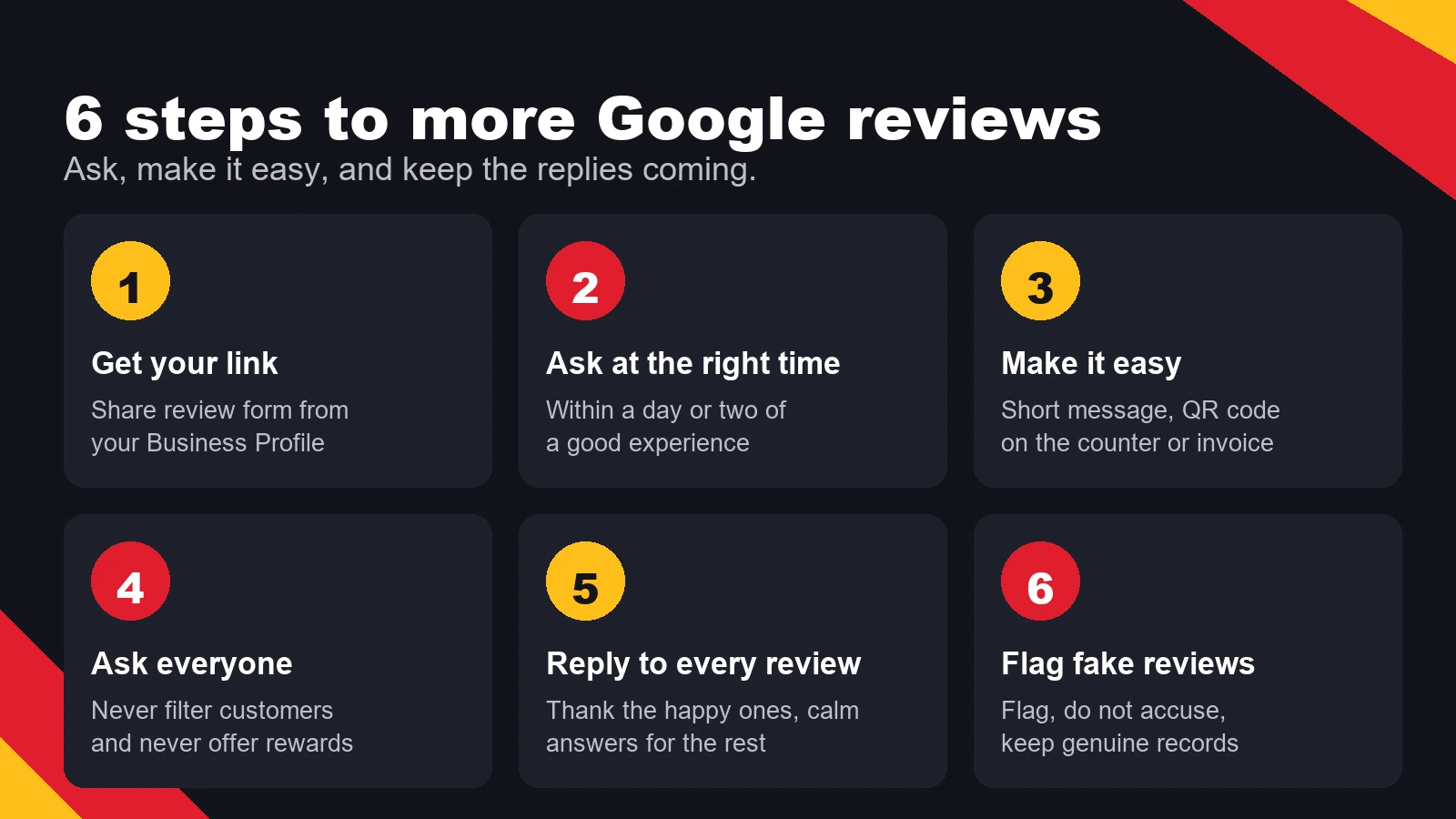
Start with the link, because a request without a link makes the customer search for you, and many will not bother. Sign in to your Google Business Profile, open the Home or Reviews section, and use the option to get more reviews or share the review form. Google gives you a short link that opens the review box for your business directly.
Test the link on your own phone before you share it. Make sure it opens the right business, and that the review box appears without asking the customer to search for the name. Save the link in your phone notes so your team can paste it into a message in seconds.
Step 2: Ask at the right moment
The best time to ask is when the customer is still happy with the result and the work is fresh in their mind. For a clinic, that is after a good visit. For a store, it is when the order is delivered. For an agency, it is after a delivered milestone or a report that showed results. Ask within a day or two, while the details are still clear.
Ask in person when you can, then follow up in the channel your customer already uses. WhatsApp is common for Pakistani customers, email works well for B2B clients, and a printed receipt or invoice can carry the link too. One clear request is enough. Repeated reminders annoy customers and make them less likely to review.
Step 3: Make it easy with a short message and a QR code
A short, polite message works better than a long one. Use something like this, and change the name and details to suit your business:
"Thank you for choosing us, Ayesha. If you have a minute, would you share how the project went? Here is the link: [your short link]. Thank you."
A QR code helps when the customer is in front of you. Place it on the counter, on the reception desk, on the invoice or on a card in the delivery parcel. Print the QR code from your own review link, not from a random generator, so the code always opens your review box. Check it every few months, because a broken code is worse than none.
Step 4: Ask every customer, not only the happy ones
Do not pick only the customers you think will give five stars. Google's review rules do not allow businesses to filter who is asked based on how happy they seem, and a profile that only collects praise from hand-picked customers looks unnatural to the people reading it. The simple rule is to ask every customer you served in the period, then let the reviews come in as they come.
The same goes for rewards. Do not offer a discount, gift or cash for a review. Incentivised reviews break Google's policy and can lead to reviews being removed. If you want to thank customers, do it for their business, not for a review.
Step 5: Reply to every review
Replies show future customers that you are active and that you listen. Aim to reply to every review, the good and the bad, within a few days. For a positive review, thank the person by first name, mention one specific thing they said, and invite them back. Keep it short and natural. Repeating the same template word for word on every review looks automatic.
For a negative review, stay calm and do not argue in public. Acknowledge the experience, apologise for the part that went wrong, and offer to fix it offline with a phone number or email. Never share the customer's personal details, order information or medical information in your reply, even if you think the review is unfair. Future readers judge the business by how it handles a bad day.
Fake reviews and what Google does not allow
Buying reviews, posting reviews from staff or friends who did not use the service, and writing reviews about competitors all break Google's policies. Google removes content that breaks its rules, and in serious cases a profile can be suspended. Recovering a suspended profile takes time and can cost you the reviews and the ranking you built.
If you see fake reviews on a competitor's profile, flag the review in Google Business Profile as inappropriate rather than replying with an accusation. Google reviews the flag, and you do not need to prove the case in public. Keep your own records of real customers, such as booking confirmations or invoices, in case Google asks for more information about your business.
A 30-day plan for a Karachi business
- Week 1: Get your review link, test it on two phones and save it in your team's notes.
- Week 1: Print a QR code and place it at the counter, reception or in your invoice template.
- Week 2: Write your short request message and send it to every customer served that week.
- Week 2: Set one person to check new reviews every two days.
- Week 3: Reply to every review you have not answered yet, starting with the oldest.
- Week 3: Review your last 20 customers and make sure each one had a chance to review.
- Week 4: Check your review count and reply rate, then adjust the message or timing if few customers respond.
Keep the plan going after the first month. Consistent asking matters more than a big push. A business that asks ten customers every week will usually build a healthier profile than one that asks fifty customers once and then stops.
Reviews work best alongside the rest of your profile. Your categories, services, photos and posts all tell Google and customers what you do, and the step-by-step guide to Google Business Profile optimization covers those parts. The full set of local steps is in our Local SEO Checklist for Karachi Businesses.
Related guides: Why Local SEO is Essential for Small Businesses in Pakistan, How Customer Feedback Improves Digital Marketing Strategies.
Frequently asked questions
How many Google reviews do I need?
There is no fixed number that guarantees rankings. What matters more is a steady flow of recent reviews from real customers, with replies from the business. A profile with a few recent, detailed reviews and active replies often looks stronger than one with many old reviews and no replies.
Can I offer a discount for leaving a review?
No. Offering a discount, gift or payment for a review goes against Google's review policy. Reviews collected that way can be removed, and the profile can be penalised. Thank customers for their business instead, and ask for a review without attaching a reward.
Should I reply to a negative review?
Yes. A calm, specific reply shows future customers how you handle problems. Apologise for what went wrong, invite the customer to continue the conversation offline, and never share their personal or order details in public. Many readers pay more attention to the reply than to the complaint.
Can I remove a fake review about my business?
You can flag a review that you believe breaks Google's policies, and Google decides whether to remove it. You cannot force a removal, and the outcome is not guaranteed. Keep a record of your genuine customers and reply to the review calmly without accusing the author in public.